Thursday, February 12, 2015


Tuesday, September 23, 2014
Factions and Splinters
"The world is full of factions, and whenever we get close to a unifying harmonic convergence, humans split into competing groups. Humans find some way to splinter." -- Puppet vs Chef Blog
Sunday, September 8, 2013
Converting a Dictionary formatted String to Python Dictionary object
From my github repo: https://github.com/weqaar/gpio
Say you have this in a text file, a String in Dictionary format.
You just can't read it as a Dict object, this will need String to Dict conversion.
SERVER_LIST={mysql:145,queue:144}
Say you have this in a text file, a String in Dictionary format.
You just can't read it as a Dict object, this will need String to Dict conversion.
SERVER_LIST={mysql:145,queue:144}
#Convert String to Dictionarygpio_dict = {}strdict = conf_params.SERVER_DICT.strip("{").strip("}")for item in strdict.split(','):key,value = item.split(':')if gpio_dict.get( key ):gpio_dict[ key ] += int( value )else:gpio_dict[ key ] = int( value )
Wednesday, December 12, 2012
TI-RTOS
TI-RTOS: A Real-Time Operating System for TI Devices (ARM MCU Cores)
Its Free of Charge! Implements BSD Sockets and a full Ethernet stack.
Here is the PDF: http://www.ti.com/lit/ml/sprt646/sprt646.pdf
Official site: http://www.ti.com/lsds/ti/tools-software/rtos.page
SDK: http://software-dl.ti.com/dsps/dsps_public_sw/sdo_sb/targetcontent/mcusdk/1_00_01_74/index_FDS.html
Wednesday, August 8, 2012
Lose wires
Design News - Sherlock Ohms - Blowing Fuses & Exploding Circuit Panels
So true, my Aircon circuit breaker blew 5 times, I then put a 32 Amp breaker in there from 16 Amp previously, blew again; figured out there were lose wires!
Sunday, September 11, 2011
Background Processes vs. a Daemon: code a daemon
This is from my comment to LinkedIn The Linux Foundation group post "How To Create A Daemon In Linux?".
Background processes vs. a daemon: i.e. if you have a bash script with a super-loop or a while true:
A UNIX Daemon has two general mandatory requirements to be called a "daemon" - UNIX-lexically if you will: it must run as a child of init, and it must not be connected to a terminal.
What you have is a bash script - a process that is forked by bash/shell with the PPID of the shell itself but not init. Secondly, since it is a child process of bash and bash attaches itself to a terminal or TTY, it does not meet the second requirement as well.
So what you have is simply a background process with no knowledge of its environment and that makes it an alien to the system which puts its own survival at danger.
strace your-daemon.sh 2> tmp.txt
vi tmp.txt and you will notice a call to execve(), what that means is bash/shell that is forked by init, exec's a child process - your daemon script.
Reference from the must-have book title "Linux System Programming Talking Directly To The Kernel and C Library":
In general, a program performs the following steps to become a daemon:
1. Call fork( ). This creates a new process, which will become the daemon.
2. In the parent, call exit( ). This ensures that the original parent (the daemon’s
grandparent) is satisfied that its child terminated, that the daemon’s parent is no
longer running, and that the daemon is not a process group leader. This last
point is a requirement for the successful completion of the next step.
3. Call setsid( ), giving the daemon a new process group and session, both of
which have it as leader. This also ensures that the process has no associated controlling terminal (as the process just created a new session, and will not assign one).
4. Change the working directory to the root directory via chdir( ). This is done
because the inherited working directory can be anywhere on the filesystem. Daemons tend to run for the duration of the system’s uptime, and you don’t want to keep some random directory open, and thus prevent an administrator from
unmounting the filesystem containing that directory.
5. Close all file descriptors. You do not want to inherit open file descriptors, and,
unaware, hold them open.
6. Open file descriptors 0, 1, and 2 (standard in, standard out, and standard error) and redirect them to /dev/null.
In addition (not in the book) 7. Trap and handle Signals (see Perl script that follows)
Secondly, if not C, I would recommend using Python or Perl (I am a recent Python convert) for creating daemons; and manage run-control/rc scripts on these lines: http://weqaar.blogspot.com/2011/03/virtualbox-service.html
Here is a Perl sample that illustrates:
ServiceAlert: Monitors a process spawned by a service in /etc/rcX. Alerts using a remote SMTP server if the service is down and restarts it.
View/Download at https://sites.google.com/site/weqaar/Home/files/service-alert.pl?attredirects=0&d=1
Background processes vs. a daemon: i.e. if you have a bash script with a super-loop or a while true:
A UNIX Daemon has two general mandatory requirements to be called a "daemon" - UNIX-lexically if you will: it must run as a child of init, and it must not be connected to a terminal.
What you have is a bash script - a process that is forked by bash/shell with the PPID of the shell itself but not init. Secondly, since it is a child process of bash and bash attaches itself to a terminal or TTY, it does not meet the second requirement as well.
So what you have is simply a background process with no knowledge of its environment and that makes it an alien to the system which puts its own survival at danger.
strace your-daemon.sh 2> tmp.txt
vi tmp.txt and you will notice a call to execve(), what that means is bash/shell that is forked by init, exec's a child process - your daemon script.
Reference from the must-have book title "Linux System Programming Talking Directly To The Kernel and C Library":
In general, a program performs the following steps to become a daemon:
1. Call fork( ). This creates a new process, which will become the daemon.
2. In the parent, call exit( ). This ensures that the original parent (the daemon’s
grandparent) is satisfied that its child terminated, that the daemon’s parent is no
longer running, and that the daemon is not a process group leader. This last
point is a requirement for the successful completion of the next step.
3. Call setsid( ), giving the daemon a new process group and session, both of
which have it as leader. This also ensures that the process has no associated controlling terminal (as the process just created a new session, and will not assign one).
4. Change the working directory to the root directory via chdir( ). This is done
because the inherited working directory can be anywhere on the filesystem. Daemons tend to run for the duration of the system’s uptime, and you don’t want to keep some random directory open, and thus prevent an administrator from
unmounting the filesystem containing that directory.
5. Close all file descriptors. You do not want to inherit open file descriptors, and,
unaware, hold them open.
6. Open file descriptors 0, 1, and 2 (standard in, standard out, and standard error) and redirect them to /dev/null.
In addition (not in the book) 7. Trap and handle Signals (see Perl script that follows)
Secondly, if not C, I would recommend using Python or Perl (I am a recent Python convert) for creating daemons; and manage run-control/rc scripts on these lines: http://weqaar.blogspot.com/2011/03/virtualbox-service.html
Here is a Perl sample that illustrates:
ServiceAlert: Monitors a process spawned by a service in /etc/rcX. Alerts using a remote SMTP server if the service is down and restarts it.
View/Download at https://sites.google.com/site/weqaar/Home/files/service-alert.pl?attredirects=0&d=1
Saturday, September 3, 2011
Linux Post Memory Corruption Memory Analyzer
Its a great tool, for fork()'s only, not for Disney Windows.
Read the paper here: http://www.pmcma.org/wp-content/uploads/2011/09/bhus_2011_brossard.pdf
Read the paper here: http://www.pmcma.org/wp-content/uploads/2011/09/bhus_2011_brossard.pdf
Monday, August 29, 2011
Saving power with Linux
"LessWatts.org is not about marketing, trying to sell you something or comparing one vendor to another. LessWatts.org is about how you can save real watts, however you use Linux* on your computer or computers.
LessWatts is about creating a community around saving power on Linux, bringing developers, users, and sysadmins together to share software, optimizations, and tips and tricks."
LessWatts is about creating a community around saving power on Linux, bringing developers, users, and sysadmins together to share software, optimizations, and tips and tricks."
Tuesday, March 22, 2011

Tuesday, March 15, 2011
VirtualBox Service
Here is how we run VirtualBox VMs as a service:
Create a run control script: /etc/init.d/rc.vm
Use chkconfig to start the service on boot:
Start and Stop individual VMs with:
VMs are accessible over RDP using ports 9000+
Edit rc.vm to include:
#!/bin/sh
### BEGIN INIT INFO
# Provides: rc.vm
# Required-Start: $network $syslog $vboxdrv
# Required-Stop: $network $syslog
# Default-Start: 3 5
# Default-Stop: 0 1 2 6
# Description: VirtualBox Virtual Machine autostart
### END INIT INFO
VM=("WinXP-VM" "Embedded-Linux-Yocto-VM" "Meego-dev" "SELX")
case "$1" in
start)
for ((i=0; i<${#VM[@]}; i+=1))
do
echo "Starting VM: ${VM[$i]}"
/usr/bin/VBoxHeadless --startvm ${VM[$i]} --vrde=on --vrdeproperty "TCP/Ports"=$[9000+$i] 2>/dev/null &
sleep 3
done
;;
stop)
for ((i=0; i<${#VM[@]}; i+=1))
do
echo "Stopping VM: ${VM[$i]}"
/usr/bin/VBoxManage controlvm ${VM[$i]} poweroff 2>/dev/null
done
;;
status)
/usr/bin/VBoxManage list runningvms 2>/dev/null
;;
stopvm)
if [ $# -gt 1 ]; then
for ((i=0; i<${#VM[@]}; i+=1))
do
if [ "$2" = ${VM[$i]} ]; then
echo "Stopping VM: ${VM[$i]}"
/usr/bin/VBoxManage controlvm ${VM[$i]} poweroff 2>/dev/null
fi
done
fi
;;
startvm)
if [ $# -gt 1 ]; then
for ((i=0; i<${#VM[@]}; i+=1))
do
if [ "$2" = ${VM[$i]} ]; then
echo "Stopping VM: ${VM[$i]}"
/usr/bin/VBoxHeadless --startvm ${VM[$i]} --vrde=on --vrdeproperty "TCP/Ports"=$[9000+$i] 2>/dev/null &
fi
done
fi
;;
*)
echo "Usage: $0 {start|stop|status}"
exit 1
;;
esac
Create a run control script: /etc/init.d/rc.vm
Use chkconfig to start the service on boot:
chkconfig add rc.vm
chkconfig rc.vm on
chkconfig rc.vm on
Start and Stop individual VMs with:
service rc.vm startvm Meego-dev
service rc.vm stopvm Meego-dev
service rc.vm stopvm Meego-dev
VMs are accessible over RDP using ports 9000+
Edit rc.vm to include:
#!/bin/sh
### BEGIN INIT INFO
# Provides: rc.vm
# Required-Start: $network $syslog $vboxdrv
# Required-Stop: $network $syslog
# Default-Start: 3 5
# Default-Stop: 0 1 2 6
# Description: VirtualBox Virtual Machine autostart
### END INIT INFO
VM=("WinXP-VM" "Embedded-Linux-Yocto-VM" "Meego-dev" "SELX")
case "$1" in
start)
for ((i=0; i<${#VM[@]}; i+=1))
do
echo "Starting VM: ${VM[$i]}"
/usr/bin/VBoxHeadless --startvm ${VM[$i]} --vrde=on --vrdeproperty "TCP/Ports"=$[9000+$i] 2>/dev/null &
sleep 3
done
;;
stop)
for ((i=0; i<${#VM[@]}; i+=1))
do
echo "Stopping VM: ${VM[$i]}"
/usr/bin/VBoxManage controlvm ${VM[$i]} poweroff 2>/dev/null
done
;;
status)
/usr/bin/VBoxManage list runningvms 2>/dev/null
;;
stopvm)
if [ $# -gt 1 ]; then
for ((i=0; i<${#VM[@]}; i+=1))
do
if [ "$2" = ${VM[$i]} ]; then
echo "Stopping VM: ${VM[$i]}"
/usr/bin/VBoxManage controlvm ${VM[$i]} poweroff 2>/dev/null
fi
done
fi
;;
startvm)
if [ $# -gt 1 ]; then
for ((i=0; i<${#VM[@]}; i+=1))
do
if [ "$2" = ${VM[$i]} ]; then
echo "Stopping VM: ${VM[$i]}"
/usr/bin/VBoxHeadless --startvm ${VM[$i]} --vrde=on --vrdeproperty "TCP/Ports"=$[9000+$i] 2>/dev/null &
fi
done
fi
;;
*)
echo "Usage: $0 {start|stop|status}"
exit 1
;;
esac
Wednesday, March 9, 2011
_START - the very first C routine
"_start" is the first routine in the .text section (glibc), it calls "main" - the entry point in the executable.
Here is a piece of code for explanation:
[weqaar@sensorflock c]$ more pid.c
#include
#include
#include
void main (void) {
printf ("PID = %d\n", getpid());
printf ("PPID = %d\n", getppid());
execit();
}
void execit (void) {
int ret;
ret = execl ("/home/weqaar/c/pid2", "pid2", NULL);
}
[weqaar@sensorflock c]$ more pid2.c
#include
#include
#include
void main (void) {
printf ("PID pid2 = %d\n", getpid());
printf ("PPID pid2 = %d\n", getppid());
}
[weqaar@sensorflock c]$ gcc pid2.c -o pid2
[weqaar@sensorflock c]$ gcc pid.c -o pid
[weqaar@sensorflock c]$ objdump --disassemble pid
Disassembly of section .text:
080483a0 <_start>:
80483a0: 31 ed xor %ebp,%ebp
80483a2: 5e pop %esi
80483a3: 89 e1 mov %esp,%ecx
80483a5: 83 e4 f0 and $0xfffffff0,%esp
80483a8: 50 push %eax
80483a9: 54 push %esp
80483aa: 52 push %edx
80483ab: 68 c0 84 04 08 push $0x80484c0
80483b0: 68 d0 84 04 08 push $0x80484d0
80483b5: 51 push %ecx
80483b6: 56 push %esi
80483b7: 68 54 84 04 08 push $0x8048454
80483bc: e8 97 ff ff ff call 8048358 <__libc_start_main@plt>
"The .text section contains the actual machine instructions which make up your program." Notice the second last line above " 80483b7: 68 54 84 04 08 push $0x8048454", 0x8048454 is the address of "" routine:
08048454:
8048454: 55 push %ebp
[weqaar@sensorflock c]$ nm pid
08049668 d _DYNAMIC
08049734 d _GLOBAL_OFFSET_TABLE_
0804857c R _IO_stdin_used
w _Jv_RegisterClasses
08049658 d __CTOR_END__
08049654 d __CTOR_LIST__
08049660 D __DTOR_END__
0804965c d __DTOR_LIST__
08048650 r __FRAME_END__
08049664 d __JCR_END__
08049664 d __JCR_LIST__
0804975c A __bss_start
08049758 D __data_start
08048530 t __do_global_ctors_aux
080483d0 t __do_global_dtors_aux
08048580 R __dso_handle
w __gmon_start__
0804852a T __i686.get_pc_thunk.bx
08049654 d __init_array_end
08049654 d __init_array_start
080484c0 T __libc_csu_fini
080484d0 T __libc_csu_init
U __libc_start_main@@GLIBC_2.0
0804975c A _edata
08049764 A _end
0804855c T _fini
08048578 R _fp_hw
080482f8 T _init
080483a0 T _start
0804975c b completed.5963
08049758 W data_start
08049760 b dtor_idx.5965
08048490 T execit
U execl@@GLIBC_2.0
08048430 t frame_dummy
U getpid@@GLIBC_2.0
U getppid@@GLIBC_2.0
08048454 T main
U printf@@GLIBC_2.0
Here is a piece of code for explanation:
[weqaar@sensorflock c]$ more pid.c
#include
#include
#include
void main (void) {
printf ("PID = %d\n", getpid());
printf ("PPID = %d\n", getppid());
execit();
}
void execit (void) {
int ret;
ret = execl ("/home/weqaar/c/pid2", "pid2", NULL);
}
[weqaar@sensorflock c]$ more pid2.c
#include
#include
#include
void main (void) {
printf ("PID pid2 = %d\n", getpid());
printf ("PPID pid2 = %d\n", getppid());
}
[weqaar@sensorflock c]$ gcc pid2.c -o pid2
[weqaar@sensorflock c]$ gcc pid.c -o pid
[weqaar@sensorflock c]$ objdump --disassemble pid
Disassembly of section .text:
080483a0 <_start>:
80483a0: 31 ed xor %ebp,%ebp
80483a2: 5e pop %esi
80483a3: 89 e1 mov %esp,%ecx
80483a5: 83 e4 f0 and $0xfffffff0,%esp
80483a8: 50 push %eax
80483a9: 54 push %esp
80483aa: 52 push %edx
80483ab: 68 c0 84 04 08 push $0x80484c0
80483b0: 68 d0 84 04 08 push $0x80484d0
80483b5: 51 push %ecx
80483b6: 56 push %esi
80483b7: 68 54 84 04 08 push $0x8048454
80483bc: e8 97 ff ff ff call 8048358 <__libc_start_main@plt>
"The .text section contains the actual machine instructions which make up your program." Notice the second last line above " 80483b7: 68 54 84 04 08 push $0x8048454", 0x8048454 is the address of "
08048454
8048454: 55 push %ebp
[weqaar@sensorflock c]$ nm pid
08049668 d _DYNAMIC
08049734 d _GLOBAL_OFFSET_TABLE_
0804857c R _IO_stdin_used
w _Jv_RegisterClasses
08049658 d __CTOR_END__
08049654 d __CTOR_LIST__
08049660 D __DTOR_END__
0804965c d __DTOR_LIST__
08048650 r __FRAME_END__
08049664 d __JCR_END__
08049664 d __JCR_LIST__
0804975c A __bss_start
08049758 D __data_start
08048530 t __do_global_ctors_aux
080483d0 t __do_global_dtors_aux
08048580 R __dso_handle
w __gmon_start__
0804852a T __i686.get_pc_thunk.bx
08049654 d __init_array_end
08049654 d __init_array_start
080484c0 T __libc_csu_fini
080484d0 T __libc_csu_init
U __libc_start_main@@GLIBC_2.0
0804975c A _edata
08049764 A _end
0804855c T _fini
08048578 R _fp_hw
080482f8 T _init
080483a0 T _start
0804975c b completed.5963
08049758 W data_start
08049760 b dtor_idx.5965
08048490 T execit
U execl@@GLIBC_2.0
08048430 t frame_dummy
U getpid@@GLIBC_2.0
U getppid@@GLIBC_2.0
08048454 T main
U printf@@GLIBC_2.0
Tuesday, July 20, 2010
Comsoc tutorial on Optical and WDM
Good tutorial on Optical and WDM:
http://host.comsoc.org/freetutorial/gigoptix/gigoptix.html
http://host.comsoc.org/freetutorial/gigoptix/gigoptix.html
Friday, July 2, 2010
Explosive Detection Technology
Scientists readily admit that the state of the art in detecting chemical explosives is still a dog's nose!
Monday, April 12, 2010
Linux integration with Microsoft AD
Linux Integration with MS Active Directory
Linux integrates well with Microsoft Active Directory using Samba Winbind, Kerberos, and Pam modules. Your Linux server can be setup to login using your Windows credentials, mount drives automatically based on the Active Credentials, and manage sessions using Kerberos tickets. Please note that applications such as Firefox need to understand Kerberos and be configured properly to work with Kerberos sessions.Here we assume that your AD server also hosts the Kerberos service.

Package requirements (Redhat EL 5 tested):
RPM:
- krb5-devel
- krb5-libs
- pam_krb5
- pam_krb5
- krb5-auth-dialog
- krb5-workstation
- krb5-devel
- krb5-libs
- samba-common
- samba-client
- samba
- system-config-samba
- samba-common
- pam_smb
- gnome-vfs2-smb
- pam_smb
Sources:
- libHX-3.2
- pam_mount-1.33
SAMBA
Create file “/etc/samba/smb.conf”:
[global]
workgroup = WORKGROUP
password server = AD-SERVER.TLD
realm = your.TLD
security = ads
idmap uid = 16777216-33554431
idmap gid = 16777216-33554431
template shell = /bin/bash
winbind use default domain = true
winbind offline logon = true
interfaces = eth0 lo
bind interfaces only = yes
socket options = SO_KEEPALIVE SO_KEEPALIVE IPTOS_LOWDELAY TCP_NODELAY
encrypt passwords = yes
winbind enum groups = yes
winbind enum users = yes
winbind cache time = 1800
domain master = no
time server = yes
passdb backend = tdbsam
netbios name = WINDOWS-MACHINE-NAME
printcap name = cups
cups options = raw
map to guest = Bad User
logon path = \\%L\profiles\.msprofile
logon home = \\%L\%U\.9xprofile
logon drive = P:
winbind refresh tickets = yes
[homes]
comment = Home Directories
valid users = %S, %D%w%S
browseable = No
read only = No
inherit acls = Yes
[profiles]
comment = Network Profiles Service
path = %H
read only = No
store dos attributes = Yes
create mask = 0600
directory mask = 0700
[users]
comment = All users
path = /home
read only = No
inherit acls = Yes
veto files = /aquota.user/groups/shares/
[groups]
comment = All groups
path = /home/groups
read only = No
inherit acls = Yes
[printers]
comment = All Printers
path = /var/tmp
printable = Yes
create mask = 0600
browseable = No
[print$]
comment = Printer Drivers
path = /var/lib/samba/drivers
write list = @ntadmin root
force group = ntadmin
create mask = 0664
directory mask = 0775
KERBEROS
Create file “/etc/krb5.conf”:
[logging]
default = FILE:/var/log/krb5libs.log
kdc = FILE:/var/log/krb5kdc.log
admin_server = FILE:/var/log/kadmind.log
[libdefaults]
default_realm = your.TLD
dns_lookup_realm = true
dns_lookup_kdc = true
ticket_lifetime = 120h
renew_lifetime = 14d
forwardable = yes
[realms]
AD-SERVER.TLD = {
kdc = AD-SERVER.TLD
admin_server = AD-SERVER.TLD
default_domain = AD-SERVER.TLD
}
[domain_realm]
.your.tld = YOUR.TLD
your.tld = YOUR.TLD
[appdefaults]
pam = {
debug = false
ticket_lifetime = 36000
renew_lifetime = 36000
forwardable = true
krb4_convert = false
}
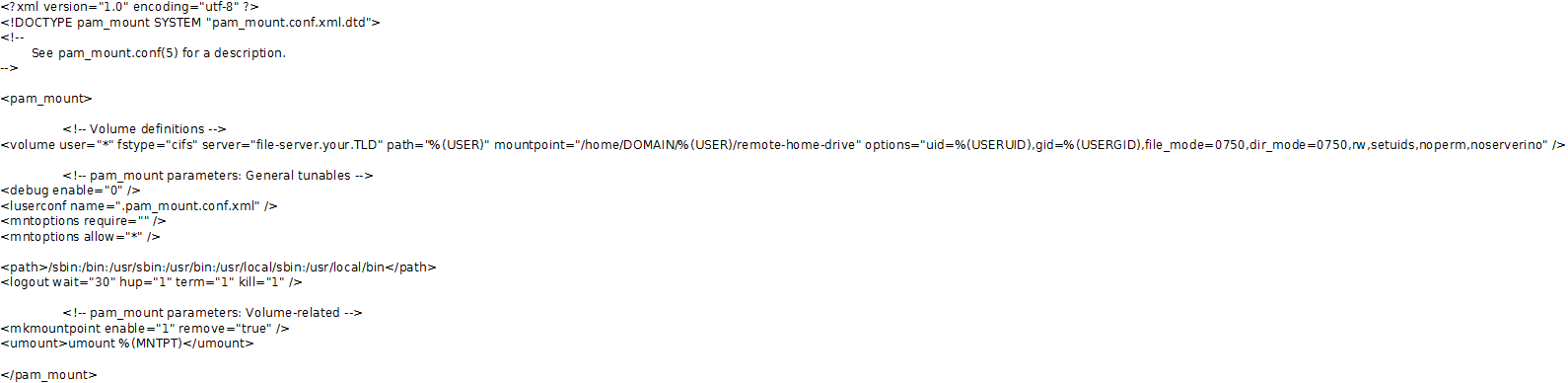
Automount CIFS shares (U-Drive)
Create file “/etc/security/pam_mount.conf.xml”:
Create file “/etc/pam.d/system-auth-ac”:
#%PAM-1.0
# This file is auto-generated.
# User changes will be destroyed the next time authconfig is run.
auth required pam_mount.so
auth required pam_env.so
auth sufficient pam_unix.so nullok try_first_pass
auth requisite pam_succeed_if.so uid >= 500 quiet
auth sufficient pam_krb5.so use_first_pass
auth sufficient pam_winbind.so cached_login use_first_pass
auth required pam_deny.so
account required pam_access.so
account required pam_unix.so broken_shadow
account sufficient pam_localuser.so
account sufficient pam_succeed_if.so uid < 500 quiet
account [default=bad success=ok user_unknown=ignore] pam_krb5.so
account [default=bad success=ok user_unknown=ignore] pam_winbind.so cached_login
account required pam_permit.so
password requisite pam_cracklib.so try_first_pass retry=3
password sufficient pam_unix.so md5 shadow nullok try_first_pass use_authtok
password sufficient pam_krb5.so use_authtok
password sufficient pam_winbind.so cached_login use_authtok
password required pam_deny.so
session optional pam_keyinit.so revoke
session required pam_limits.so
session optional pam_mkhomedir.so
session [success=1 default=ignore] pam_succeed_if.so service in crond quiet use_uid
session required pam_unix.so
session optional pam_krb5.so
session optional pam_mount.so
Reinit all daemons and test!
It should all work fine.
Read the documentation for Winbind/Samba, and Kerberos in detail.
Monday, January 4, 2010
Wednesday, December 16, 2009
Java on Embedded Devices - Internals
Java Virtual Machine is a Layer between the OS and Java Code (byte-code), code that you execute within a JVM first compiles into a byte-code (code that the JVM understands but not your OS - a standardized portable binary format), the JVM in-turn executes appropriate OS specific system calls.
Now what does "issuing system calls" mean for the JVM? simple: it doesn't run in kernel space, JVM runs in user space.
JVM is a middle-ware: soft-ware between the kernel and the operating system user-space. Byte code is standardization of JAVA (not necessarily) source code - write once: you do not need to worry about the target processor architecture/core, the other half of the JVM (kernel interface) takes care of that. JVM is like another processor with an instruction set.
First half of the JVM is the byte code compiler and kernel interface is the second half.
In embedded world we do not really worry about the first half much, second half is sure a concern - should be at least. We do understand that the JVM is an additional processing element within a system: Adding a(n) element(s) to any system results in an increase in overall complexity -> (increase in probability for faults -> probability for reduction in performance) .
Re-visit: JVM is an additional layer between the JAVA Application and the host operating system (e.g. Linux), and by nature use Green threads (not OS Native threads) [very similar to emulation].
A short intro to System-on-chips: A single mega-colony of System-on-chips (SoC) has colonized much of the world, embedded processors are now what server processors used to be in not so old days. Embedded processors come in varieties of cores such as x86 and ARM.
System-on-chips (SoC) package the processor with otherwise external components such as Ethernet and 802.11 PHYs, A/D, Video/Audio in a single chip. This significantly removes the need for analog components that otherwise be required such as (including but not limited to) resistors, capacitors, clocks, inductors, and oscillators. This implies reduced physical space on the PCB, low-power consumption, low heat dissipation, low-latency (removes inter-wiring of components), increased reliability.
Since many embedded devices run off batteries, low-power consumption is a requirements and that comes with a hefty price tag - negative impact on performance-per-watt.
Real-time performance: Low-latency and Deterministic response is usually a requirement (not met for various reasons) for embedded devices.
Subscribe to:
Posts (Atom)